Module Reprogramming starts from $300+
Reprogramming may not fix your issue, reprogramming usually is recomended if there is a TSB is avaliable and specifies reprogramming for a certain issue.
Mitsubishi J2534 reprogramming requires an active subscription to the Mitsubishi Tech Info website to download and use the official MUT-3 SE software with a compatible J2534 pass-thru device.
Software and Subscriptions
To access the necessary software and calibration files, you must purchase a subscription from the official Mitsubishi service information website, which is mitsubishitechinfo.com.
- MUT-3 SE Software: This is Mitsubishi’s official diagnostic and reprogramming software. The “R2R” (Right-to-Repair) version is available for independent shops and works with J2534 devices.
- Subscription: The software requires a valid username and password to log in to Mitsubishi’s online server for programming and updates. The exact costs are not clearly specified, but options like daily, monthly, or annual subscriptions are typical for OEMs.
- Security Access: Accessing certain security-related functions may require two-factor authentication or a NASTF VSP credential.
Hardware Requirements
In addition to a Windows-based PC, specific hardware is needed:
- J2534 Pass-Thru Device: You need a J2534-1 compliant interface. Mitsubishi has validated devices such as the Drew Technologies CarDAQ-Plus 3 and the Bosch MVCI. Other compatible options include:
- Computer: A PC running Windows is required. Some sources mention using Windows 10 Pro with Chrome as the default browser as an ideal configuration.
- Stable Power Supply: A high-amperage, regulated power supply is critical to maintain constant voltage (around 13.5V) during the flash process to prevent damage to the ECU.
- Reliable Internet: Needed to log into the DXA server and download the calibration files.
Key Considerations
- Model Year Coverage: J2534 pass-thru reprogramming is available for most 2004 and newer emissions-related ECUs (Powertrain, Engine, Transmission) as mandated by the EPA. Support may extend to older, reprogrammable models.
- K-Line PCMs: Some older K-Line PCMs require a special Y-cable adapter to connect to both the 16-pin OBD-II port and the vehicle’s proprietary 12- or 13-pin connector.
- Troubleshooting Login Issues: Technicians have reported issues with logging into the DXA server with an active subscription. Mitsubishi has released software updates to address these issues, and ensuring you have the latest software version is key.
- Diagnostics Limitations: The J2534 J2534 Reprogramming and Diagnostic Tool software for 2018+ vehicles does include diagnostics, but the primary function for R2R is reprogramming. For older models, a full subscription to the official MUT-3 system might offer broader diagnostic capabilities.
PCM INITIALIZATION
Replacement Mitsubishi PCMs (for models equipped with immobilizer systems) require “initialization” after installation. Initialization is a one-time-only procedure which can be performed at any repair facility in order to return the vehicle to service.
Failure to initialize the PCM will result in a no-crank, no-start condition. If you have installed a new PCM, Mitsubishi offers two options for PCM initialization:
- Rent a Mitsubishi MUT-III from Bosch by calling them at 1-888-727-6672, prompt #2
- Take the vehicle to your nearest Mitsubishi retailer for service
- Newer Mitsubishi powertrains equipped with the CAN system do not require the use of the MUT-III for initialization. These vehicle PCMs will be initialized in the J-2534 reflash procedure. Refer to the following table to confirm whether your vehicle is equipped with the CAN system.
PCM (ECU) REPROGRAMMING
Mitsubishi vehicle engine PCMs (ECUs) have been equipped with reprogrammable processors since 1998 (except 1998 Galant). 1995~1999 Mitsubishi Eclipse RS & GS with 2.0L non-turbo engine (Chrysler 420A engine) ECUs have been equipped with reprogrammable processors since 1995.
To reprogram Mitsubishi vehicles, you must use one of two different reprogramming tools. For the 1995~1999 Mitsubishi Eclipse RS & GS (with Chrysler 420A engine), you must use a Chrysler Flash Reprogramming Unit, MIT992000-A . Click here to order one from Bosch, or call them at 1-800-533-5338.
To reprogram all other Mitsubishi vehicles identified in the Mitsubishi ECU Reprogramming Application Table, you can purchase or rent the Mitsubishi MUT-III scan tool. Call 1-888-727-6672 for purchase or rent information, or Click here for more information. In addition to these options, you can use an approved J2534 solution for reprogramming. See the J2534 link at the top of the page for more information.
- OBD-II DATA INFORMATION (On-Board Diagnostics, Level Two)
OBD-II has been mandated by government regulations, first in California and eventually across the entire U.S. All models from 1996 to present are equipped with OBD-II. A limited number of 1995 models were also equipped with OBD-II.
OBD-II is a product of the California Air Resource Board . Some of the regulations were developed in conjunction with the auto industry through the SAE (The Society of Automotive Engineers). Other areas were written and mandated by CARB .
OBD-II focuses on having the vehicle control systems monitor and report information related to emissions controls. The information required to use our diagnostic equipment is available on our Service Information Page.
Introduction
Mitsubishi Motors North America, Inc. offers Right-To-Repair(R2R) capability in accordance with national MOU(Memorandum of understanding) and J2534-1 Powertrain Control Module (PCM) re-flash capability in accordance with CARB & EPA regulations.
What is R2R (Right-To-Repair)?
Under the terms of R2R (Right-To-Repair), Mitsubishi Motors North America provides access to diagnostic information (MUT3-SE) for model year 2018 and newer vehicles. You must follow Mitsubishi Service Manual procedures for proper repair.
What is J2534-1?
J2534-1 is a Society of Automotive Engineers (SAE) standard that enables the use of a J2534-1 pass-thru device (available through Special Tool Manufacturers) and a personal computer to re-program a PCM with updated instructions, as well as perform other procedures on some PCMs. Mitsubishi Motors vehicles use re-flashable PCMs starting with the 1998 model year. Before attempting a re-flash of a Mitsubishi PCM, you must obtain a validated J2534-1 pass-thru device. In addition, you must only re-flash a Mitsubishi PCM when a specific Mitsubishi Motors Technical Service Bulletin (TSB) calls for it. All TSBs are available in the Service Information portion of this website. In some cases, re-flash procedures are accompanied by replacement of parts or other related procedures. Failure to follow these guidelines may result in an unsatisfactory repair.
There are two distinct families of PCMs, based on the communication protocol used for re-flashing. Each family of PCMs requires a specific software solution available on this website as follows:
- Legacy PCMs Refer to (Reprogramming System Identification Chart) for details (ISO9141) protocol for re-flash communication. A software application, Update Manager, is required to re-flash this type of PCM. Update Manager consists of 2 parts, Update Manager A & Update Manager B. Use Update Manager A to determine the current PCM instruction level (current flash level), known as ROM-ID. Then use Update Manager B to re-flash the PCM with re-flash files and other support files downloaded from this website. If installed for the first time, some K-Line PCM’s require additional initialization procedures – for example, Immobilizer Key Code Transfer. To perform these initialization procedures, a MUT-III Special tool must be used. Please refer to the “Special Tool” section of this webpage for details.
- The latest technology PCMs Refer to (Reprogramming System Identification Chart) use CAN protocol for re-flash communication. In addition, some CAN-based PCMs require additional initialization procedures if installed in a vehicle for the first time, such as VIN writing, Variant Coding (programming specific vehicle attributes) and Immobilizer Key Code Transfer. All procedures are done using the MUT3-SE CAN Passthru application available for download from this website. Use MUT3-SE CAN Passthru to obtain the PCM Part number, VIN stored in the PCM (necessary before any other procedures). Then download additional software components and support files through MCDS Server to enable the MUT3-SE CAN Pass-Thru application to perform other procedures as needed
Requirements to Use J2534-1 Re-flash / R2R (Right-To-Repair) Capability on Mitsubishi Motors Vehicles
- A Mitsubishi Motors Technical Service Bulletin Indicating the Need for a PCM Re-flash
As stated in the J2534-1 section, Mitsubishi Motors authorizes a PCM re-flash to be applied only in the event that such a procedure is supported by a specific Mitsubishi Motors Technical Service Bulletin (TSB). Any PCM re-flash applied not in accordance with a TSB may result in an unsatisfactory repair.
- A Validated J2534-1 Pass-thru Device
Because J2534-1 is an SAE standard, in theory, any J2534-1 certified device should be able to be used to perform J2534-1 re-flashes. PCM initialization (required when replacing a Mitsubishi PCM) can be performed with the J2534-1 device with newer CAN equipped vehicles. Legacy K-line equipped vehicles will require the MUT-III Special tool to accomplish PCM initialization (See Special Tools section). For a chart of CAN and K-Line equipped vehicles, please refer to CAN/KLINE Chart. Several special tool manufacturers have J2534-1 pass-thru devices available for sale. Mitsubishi Motors testing to date has found that there are some differences between the available devices in the market. Therefore, Mitsubishi Motors can only recommend the use of devices that have been validated to work on Mitsubishi Motors vehicles with Update Manager and Pass-Thru CAN (Mitsubishi Motors software applications to perform PCM procedures using a J2534-1 pass-thru device).
Before using either Mitsubishi Motors J2534-1 software application, be sure to have a validated J2534-1 Pass Thru Device. Currently the Drewtech CarDAQ-Plus (with 1.9.38 drivers) and the BOSCH MVCI (with 13.0.75.27 drivers) have been validated with Mitsubishi Vehicles. For more information on these devices, please go to www.drewtech.com and www.boschdiagnostics.com.
Note: At this time, the Actia PassThru XS+ has not been validated with newer re-flashes.
- A Windows Based Personal Computer
A personal computer is required to host Update Manager, MUT3-SE CAN Passthru/R2R and connect to the J2534-1 Pass-thru Device. Requirements for the computer are as follows:
- For KLINE reflashes, the Update Managers A & B softwares are only supported in Windows 2000, Windows XP Pro + SP3, Windows 7 (32-bit) operating systems.
- For CAN reflashes, the MUT3-SE CAN Passthru/R2R software is supported in Windows 7 (32-bit) operating systems.
- For Windows 7 (32-bit), the MUT3-SE CAN Passthru software and Update Manager A & B requires temporary adjustment of the User Account Control Settings (UAC) to enable software activation.
- To change the UAC settings in Windows 7:
1. Open Control Panel.2. Click on the User Accounts icon.3. Click on the User Accounts icon. This is not the same icon clicked in the previous step. This icon will be smaller.4. Click on Change User Account Control settings.5. Remember your last setting for the slider bar and then move the slider thumb to Never notify.6. Click OK to accept the changes and reboot the PC for changes to take effect.7. After using the MU3-SE CAN PassThru/R2R software, return the UAC settings to your previous setting or set it to Default. Another reboot is required for changes to take effect. - 256 megabytes of RAM (at least 256 megabytes recommended)
- An available serial port or USB connection.
- An internet connection
- Sufficient hard drive space to install Update Manager / MU3-SE CAN PassThru/R2R and store re-flash files & other support files (40 megabyte minimum).
- Pass-thru Device Adapter Cable
Some K-Line PCMs require a special Y-cable adapter to connect the 16 pin OBD-II data-link connector from the J2534-1 pass-thru device to both the Mitsubishi 12 or 13 pin proprietary connector & the on-board 16 pin data-link connector. This cable can be purchased through Bosch Automotive Service Solutions (Part number MIT47295). Refer to the Adapter Cable Chart to determine which vehicles require the adapter cable.
For more Information visit Mitsubishi Tech Info
https://mitsubishitechinfo.com

- 【A MUST-HAVE TOOL FOR DIYERS】 - VDIAGTOOL VD10 car code reader is an incredibly useful obd scanner for each car owner or hobbyist, even for those with little to no experience when it comes to vehicle mechanics! Similar to a fixd car diagnostic tool, using this car diagnostic scanner is extremely easy. All you have to do is attach it to your car OBDII port and you can diagnose car problems in seconds! Read Codes (DTCs); Clear Codes; Live Data; View Freeze Frame; I/M Readiness; Vehicle Information.
- 【KEEP ENGINE IN GOOD STATUS】 - VDIAGTOOL check engine code reader brings a fast access to scan, read the car fault code, show its definition on the screen instantly, troubleshooting to find the root causes of problems, erase the engine fault code and turn off the MIL (Malfunction Indicator Light). Similar to a fixd car diagnostic tool, this car code reader helps ensure your engine stays in top condition.
- 【READ/CLEAR CODES & DTC LOOKUP】- No search online & saving your time, this vehicle car code reader retrieves generic (P0, P2, P3, and U0), manufacturer specific (P1, P3, and U1) codes, pending codes and displays DTC definitions based on the built-in database(more than 3000 codes) on the TFT screen, find out the root causes and clear the codes after fixed.
- 【LIVE DATA & RETRIEVE FREEZE FRAME】 - This diagnostic scan tool for accurate diagnosis enables you to retrieve data from vehicle sensors, such as Engine RPM, Intake air temperature, Short/Long term fuel, Misfire data and etc. The freeze frame is stored in the PCM together with the diagnostic trouble code (DTC) related to the fault. Comparable to a fixd car diagnostic tool, the VD10 car code reader car scanner can be a valuable & practical diagnostic aid and also greatly help when diagnosing intermittent problems.
- 【I/M READINESS for THE S-nn-0-g CHECK】- OBDII vehicle may not pass the annual inspection unless the required monitors since reset are complete. So you should at least read the readiness monitors and make sure they are ready. This car obd2 scanner diagnostic tool is equipped with I/M readiness function to check the operations of the e-m-issi0n system on OBD2 compliant vehicles, run I/M monitor readiness test, checking if the pass vehicle s-m-0-g inspection.
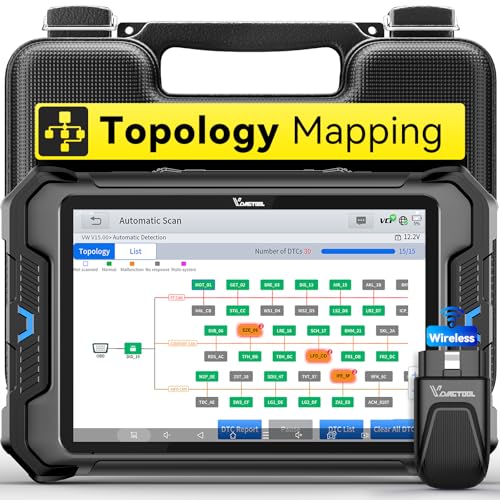
- Smarter Diagnostics, Broader Coverage, Greater Value Than $1,000+ Tools: The game-changing VD80BT OBD2 scanner delivers 4000+ active tests, 42+ hot services, advanced ECU coding, PMI & V.A.G Guided—all in one scanner for car. With OE-level full system scan and intelligent topology mapping that cuts diagnostic time by up to 50%, you'll work smarter and faster. Supporting FCA AutoAuth, CAN FD & DoIP protocols, this car scanner covers over 10,000 vehicle models worldwide. Built for serious pros and DIYers, it features 8" HD screen & 4+64GB storage, 7.3V fast charging with long-lasting battery, and 33–66ft stable wireless connection—making it the most complete diagnostic solution you’ll ever own
- Intuitive Topology Map, Fast Locate Faults: Why waste time clicking module by module? VD80BT car diagnostic scanner takes diagnostics to the next level with its intuitive Topology Map—a premium feature usually found in $1000+ obd scanner. With one tap, it performs all system scan and presents all modules and DTCs in a clear, color-coded layout, boosting diagnostic efficiency by up to 200% and helping you locate issues instantly and reduce repair time and costs. Whether you're a pro boosting efficiency or a beginner learning diagnostics, this obd2 scanner diagnostic tool makes fault-finding faster and smarter for you. Note: varies by vehicle model, please check compatibility before purchase
- Wireless Connectivity Simplifies Bi-Directional Control: With 4000+ active tests, including throttle reset, window calibration and solenoid check, VD80BT bidirectional scan tool lets you diagnose and verify functions faster, smarter, and more efficiently. This scanner for car redefines flexibility in bi-directional control through a fully wireless connection, freeing you from the constraints of wired car diagnostic tool in the workshop. Imagine actively controlling components like the A/C clutch, fuel injector, ABS pump, or radiator fan within a wireless range of 33–66ft around the vehicle—all while enjoying stable, high-speed wireless diagnostic and real-time data monitoring
- 42+ Hot Services, One Powerful Scanner for Car: Why pay a shop $100 just to reset a light? VD80BT car scanner diagnostic tool gives you 42+ hot services from basic resets to advanced maintenance tasks like Crank Sensor Relearn, Injector Coding, ABS Bleeding, Oil Reset, Throttle Relearn, EPB, BMS Reset, Tire Size Reset and more. Plus, it offers 100+ vehicle-specific features including Idle Relearn, VIN Write, Brake Fluid Replacement, Fuel Trim Reset, ABS Initialization and more. Whether you’re resetting TPMS or fixing a stubborn SAS, this car computer diagnostic reader delivers shop-grade precision at a fraction of the cost. Varies by model. Send VIN to verify compatibility before purchase
- OE-Level Full System Diagnostics in Your Hands: Dominate diagnostics like a dealership with VD80BT scan tool for all vehicles, delivering factory-grade scanning for aLL systems—including ABS, SRS, ECM, TCM and more. View up to 8 PID graphs simultaneously to quickly catch intermittent issues and troubleshoot with confidence. Easily read and clear DTCs, retrieve freeze frame data, and run active tests for faster, more accurate repairs. It’s like having a dealership-grade scan tool in your pocket, complete with data playback and CSV export for in-depth analysis. Stop guessing and start fixing with surgical precision—professional diagnostics made simple and portable. Check compatibility Please


- Affordable Solution for Professional-grade Car Diagnostics & Repair: As the budget-friendly OBD2 scanner under $300, the VD70 Lite car diagnostic tool offers 31+ hot resets, full bi-directional controls with 4000+ active tests, all system diagnostics, 8-in-One live data graphing (export as CSV Export/Recording/Playback), CAN FD & DoIP protocols, and long-term free update. Additional features include Auto VIN & Auto Scan, diagnostic report sharing/printing, with coverage for over 10,000 vehicle models worldwide, which makes it perfect for DIYers, Car Owners, Technicians, and Mechanics on car repairs and maintenance tasks.
- OBD2 Scanner with Full Bi-directional Control: The Bidirectional scan tool VIDAGTOOL VD70 Lite performs 4000+ active tests that can send execution commands to the ECU module and identify the repair status, covering for windows, doors, ABS, valves, wipers, headlights, rear mirrors, sunroof,and more in-vehicle components. This bidirectional OBD2 scanner is a must-have diagnostic tool for auto technicians and mechanics on a budget! The available function tests vary by model—please check compatibility via vdiagtool2 @ outlook . c o m before purchase.
- OE All Systems Diagnostics & 8-IN-One Data Graphing: VD70 Lite is a dealer-level car scanner diagnostic tool with Auto VIN that can do in-depth diagnostics for 100+ modern car brands, covering all systems including engine, transmission, airbag, ABS, ESP, TPMS, radio, etc, to read/clear code, view live data, freeze frame, and read ECU info. This advanced OBD2 Scanner with 8-in-one data graphing and detailed diagnostic reports makes data viewing more intuitive, ensures quickly accurate repairs by identifying issues, and easily masters the car situation.
- Stay Ahead with 31+ Reset for Faster & Easier Repairs: VDIAGTOOL VD70 Lite scanner for car meets almost all daily maintenance needs for both home mechanics and workshops as a professional automotive scan tool. It can perform Oil Reset, ABS Bleed, Crank Sensor Relearn, Idle Relearn, Injector Coding, Window Initialization, HVAC Calibration, Suspension Calibration, Throttle Matching, etc, ensuring efficient repairs and complete maintenance. Besides, long-term free updates keep its functionality and broad vehicle compatibility up to date. Functions vary by model, please send us the Vehicle Model, Year, VIN for compatibility before purchase.
- 150+ Models, 10000+ Car Coverage & 22 Languages:As a powerful car computer diagnostic tool, VD70 Lite helps you to quickly troubleshoot issues for 95% of US, European, and Asian vehicles. Supporting 22 languages makes it a global car diagnostic scanner for auto mechanics worldwide without language barriers. Note: Simply provide your tool’s S/N and reach out to vdiagtool2 @ outlook . c o m to change the menu language.
This product presentation was made with AAWP plugin.
Last update on 2026-04-04 / Affiliate links / Images from Amazon Product Advertising API