Nissan Motor Co.
Module Reprogramming starts from $300+
Module Reprogramming starts from $300+
Reprogramming may not fix your issue, reprogramming usually is recomended if there is a TSB is avaliable and specifies reprogramming for a certain issue.
Nissan J2534 reprogramming requires using specific Nissan software applications—either the older NERS (Nissan ECU Reprogramming Software) or the newer CONSULT-III Plus (C-III plus) R2R—with a validated J2534 pass-thru device. Access to the software and calibration files is purchased through a subscription on the Nissan Tech Info website.
Software and Subscriptions
Nissan uses different software depending on the model year:
- NERS: Supports reprogrammable Engine and Transmission control units for model years 1999 to 2019. This software requires a one-time purchase of the license (around $350) and a separate purchase of each individual calibration file download (around $50 per file, though prices vary).
- CONSULT-III Plus R2R: Required for engine and transmission control unit reprogramming on 2020 model year and newer vehicles. This software is subscription-based:
- 1-day subscription: ~$55.
- 30-day subscription: ~$250.
- 1-year subscription: ~$1,250.
Hardware Requirements
You need a Windows-based PC and a Nissan-validated J2534 device:
- Validated J2534 Devices: Nissan officially validates specific devices to ensure compatibility. Examples include the Opus IVS CarDAQ Plus 3, Opus IVS Mongoose-Plus Wired, and Topdon RLink series.
- Computer: A PC running Windows that meets the system requirements listed on the Nissan techinfo website. Nissan has recently shifted towards requiring Nissan-spec laptops through their dealer program, which may affect aftermarket use with C-III Plus R2R.
- Stable Power Supply: A high-amperage battery maintainer (providing around 13.6 volts) is crucial to maintain stable voltage during programming to prevent damaging the ECU.
- Reliable Internet Connection: A high-speed internet connection is required to download software and calibration files.
Key Considerations
- Reprogramming Only: The NERS and C-III Plus R2R software running in J2534 mode are only for reprogramming emissions-related ECUs (engine, transmission) and writing the VIN; they do not provide diagnostic or key programming capabilities.
- File Handling: For NERS software, the user must manually download, unpack, and save the calibration files in the correct folder on their PC before programming.
- No Diagnostics/Key Programming: For full diagnostics or non-emissions-related programming (like BCMs or keys), the official Nissan CONSULT-III Plus dealer tool (not running in R2R/J2534 mode) and a VSP account may be required.
- Follow Instructions: The process is highly sensitive to interruptions. Technicians must follow all on-screen prompts and ensure no vehicle accessories are running during the procedure.
CONSULT-III plus R2R Diagnostic Software
The generic CONSULT-III plus (C-III plus) R2R diagnostic software can be installed on any off-the-shelf personal computer that meets C-III plus software operating specifications and can be used with a compliant SAE J2534 device. See system requirements below.
Click the below link to purchase a diagnostic software subscription.
https://www.nissan-techinfo.com/dept.aspx?dept_id=25
If you have purchased the CONSULT-III plus R2R diagnostic software and you have a subscription, you may download updates from yourdownload page
Additional Information:
- Download C-III Plus R2R Quick Reference Manual – No Cost
- Download C-III Plus R2R Operation Manual – No Cost
System Requirements:
- Click here for Minimum System Requirements
- J2534_v05.00 API Complaint Device
- OPUS IVS – Car DAQ-Plus 3
- TOPDON USA – Rlink Lite, Rlink J2534, Rlink X7
CONSULT-III plus R2R Diagnostic System Information:
- Login Instructions
- CONSULT-III plus Operation Manual – click here
- Software supports diagnostics functionality on all Nissan and Infiniti 2018 model years or newer vehicles.
- Software supports all ECU programming/reprogramming & configuration on 1999 model year and newer vehicles and 2018 model year and newer for VIN writing into ECUs.
- Software does not support Immobilizer diagnosis. Immobilizer diagnosis can be completed by authorized and registered Security Professionals using CONSULT-III plus software.
- It is recommended the latest version of CONSULT-III plus R2R be installed before connecting to a vehicle.
- For a complete list of supported software functions view the C-III plus R2R Operation Manual.
CONSULT 4 R2R Diagnostic Software
The CONSULT 4 R2R diagnostic software can be installed on any personal computer that meets CONSULT 4 R2R software operating specifications and can be used with the J2534 device listed below. See system requirements below. Click the below link to purchase a diagnostic software subscription.
Click the below link to purchase a diagnostic software subscription.
https://www.nissan-techinfo.com/dept.aspx?dept_id=25
If you have purchased the CONSULT 4 R2R diagnostic software, you may download the application from yourdownload page
System Requirements:
- Click here for Minimum System Requirements
Validated Devices
- OPUS IVS CarDAQ Plus 3 (Driver & firmware version 1.2.49 or newer)
- OPUS IVS Mongoose-Plus Wired (Driver & firmware version1.0.70.0 or newer)
- TOPDON RLink Lite, RLink X7 and RLink J2534
CONSULT 4 R2R Diagnostic System Information:
- The software provides full diagnostic functionality for the following Nissan and INFINITI models: 2023 and newer ARIYA, 2024 and newer Rogue, 2025 and newer Kicks, Murano, Armada, and QX80, 2026 and newer Leaf and Sentra.
- Software does not support Immobilizer diagnosis. Immobilizer diagnosis can be completed by authorized and registered Security Professionals using CONSULT-III plus/CONSULT 4 plus software subscription.
CONSULT 4 Guides
CONSULT 4 Operation Manual – click here
CONSULT 4 Install Guide – click here
CONSULT 4 Login Instructions – click here
Support
OPUS IVS CarDAQ Plus & Mongoose-Plus set-up guide – click here
Updated driver Driver & firmware (Set-Up) and user manual for CarDAQ Plus & Mongoose-Plus Nissan2 Wired – click here
OPUS Tech Support for device set-up: Call 1-877-888-2534. Select opt. 1, then opt. 2.
TOPDON Set-up Guide – click here
TOPDON Support for device set-up: Call 833-629-4832 or click Support Ticket or click RLink Support Page.
CONSULT-III plus software supports ECU reprogramming on 1999 model year and later.
When you purchase a CONSULT-III plus reprogramming file, you will get a zip file containing a data file (.dat, .kwp, .pdx, .xcal), a .csv or .xml file and a Reprog_readme.pdf. Please review the readme file for information on where to place the files in your PC.
How to find the proper CONSULT-III plus Reprogramming ECU file:
To determine if an update is available, retrieve the current 10 digits ECU part# with your scan tool. Enter the first 5 digits in the box below, followed by the last five. A part # will be returned to purchase if an update is found.
Technical Services Bulletin(TSB) for your vehicle will advise you on the background and instructions of the update. Search for the applicable TSB at link below.
Download Purchased ECU Data File(s)
Once you have purchased ECU data file(s) and your order is completed, your ECU files can be downloaded. Please verify that you are logged in to your account before proceeding.
Visit the ECU File Downloads Page
Purchase of ECU data enables file download access for a period of 24 hours, after which time the file will not longer appear in your list of purchased data files. Be sure to download all data files immediately following your purchase.
For more Information visit Nissan TechInfo
https://www.nissan-techinfo.com/home.aspx
For more Information visit Infiniti TechInfo
https://www.infiniti-techinfo.com/Home.aspx

- [Notice] When you receive a used device, it may be a customer return resold by Amazon without inspection. You can exchange it for a new one through Amazon. As this situation is unavoidable, we sincerely apologize. For any issues, contacting us via Amazon's "Messages" is the best way, and we’ll provide a solution within 24 hours. THINKSCAN 689BT Can Be Used Immediately After It is Turned On, Without Complicated Registration Process, Which is More Convenient & Quick.
- [Good News] THINKSCAN 689BT is the most competitive automotive scan tool to date, offering wireless updates with no subscription fees(valued 500Buc.ks) . With all the features of THINKTOOL PD8,PRO, built on Android 10 platform with 4-core CPU, 4GB RAM and 64GB ROM, serving up to 5X faster than older MAX/MINI/PLUS vehicle scanners, no more slow and delayed feedbacks, it's time to update your garage tool.
- [Big Money Saver] Premium THINKSCAN 689BT Wireless Diagnostic Scanner, save up to 400USD per year, includes all useful features: Full bi-directional controls, ECU coding, 34+ services, OEM all system diagnostics, Worldwide vehicles coverage, CAN FD & DoIP, FCA AutoAuth(The 689BT only provides a login and purchase portal, and users are required to register for an FCA account and pay a membership fee in order to perform the relevant automotive diagnostics)
- [3000+ Active Tests]Active testing is one of the most useful features in automotive maintenance and greatly improves mechanic efficiency. THINKCAR 689BT bidirectional scanner can send action commends to vehicle sub-systems or components for active test without using vehicle controls. It can perform various tests such as: EVAP Test, Fuel Trim Reset, Injector Buzz Test, Window/ Mirror/ Door Lock Test, Pump and Value Tests, etc. Get functions from "Diagnose>Car Model>System>Active Test".
- [Hot Advanced Features] 689BT bidirectional tool newly adds ECU Coding, Power Balance, Flash Hidden Functions, Reset Adaptive Data, Match Replaced Components, Customize OE-Settings. Such as: 1. changing the color of interior lights 2. switching on/off the auto hold, 3. customizing dash kits 4. activating the auto side mirror folding function 5. disables auto start-stop. Note: Coding functions vary by model&year.

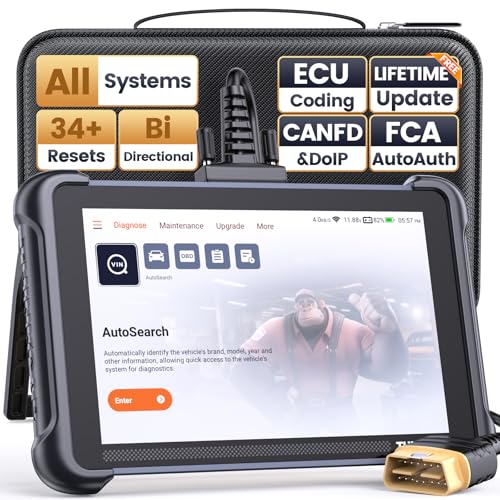
- 【Warm Tips】Wired THINKSCAN 689 is connected through a detachable OBDII cable, and we also have added OBD2 Extension Cable (about 60 cm/2 feet) as g ift, enabling customers handling vehicle repairs with ease. Just click "Bundles Item" above to get it.
- 【Professional Car Diagnostic Tool】Tired of renew fees? Thinkscan 689 scanner provides dealer-level advanced functions for lifetime f.r.e.e update for auto mechanics and repair shops. 34+ Services, 3000+ Active Test, ECU Coding, 140+ Brands Coverage, FCA AutoAuth, CANFD&DOIP Protocol, Component Matching, Power Balance, V.A.G Guided, Compatible with Google Chrome integration, etc. With strong hardware backing, 64G Memory, Android 10, 4-core processors, and 4150mAh battery. Thinkscan 689 brings you the best as your daily business helper and never lets you drop the ball!
- 【Over 34 Reset Service, Adaptation + Relearn + Calibration + Initialization + Matching】Made for workshops, Thinkscan 689 scanner provides 34+ services for worldwide vehicles: such as Gear/SAS/EPB/TPMS/D.P.F/I.M.M.O/BMS/ETS/Oil/Brake/AFS/GEARBOX/SUNROOF/SUS Reset, ABS Bleed, Injector coding, etc. Warm tips: Compatibility may vary on vehicles' model and year, please contact seller before purchase to make sure it works well on your cars.
- 【Real Active Test】Thinkscan 689 scan tool features over 3000+ full bi-directional control ability, to send commands to vehicle’s systems/components, to verify system input/output without using the vehicle's controls, e.g. turn on the radiator fan, modulate the throttle, open/close windows, operate mirrors, Injector Buz Test, turn on interior&exterior lights, sound horn, test door lock actuators, turn on/off front/rear side ACM Solenoid, Vehicle level position calibration, Wheel Speed Sensor Supply.
- 【Comprehensive Solutions with Advanced Features】Take your vehicle customization to the next level with the Thinkscan 689's advanced ECU coding capabilities. This scan tool provides power balance, PMI, unlock more new features and enhance performance by activating dormant functions, customizing OE settings, matching replaced components, and reprogramming adaptive data to elevate your driving experience. Note: Compatibility varies by car models, please check before order.

- 【15+ Advanced Reset & Calibration Functions】The Thinkdiag scanner provides 15+ professional maintenance functions, including:✔ Oil Reset | ✔ ABS Bleeding | ✔ Injector Coding | ✔ SAS Reset✔ TPMS Reset | ✔ BMS Reset | ✔ Transmission Adaptation | ✔ AFS Reset | ✔ Sunroof Calibration | ✔ Brake Reset | ✔ Suspension Relearn | ✔ Electronic Throttle Relearn | ✔ Seat Calibration | + More reset/relearn/calibrate/adaptive functions under automotive full systems diagnostic menu. Ideal professional OBDII scanner for mechanics and DIY enthusiasts, Thinkdiag delivers factory level diagnostics with adaptive relearn capabilities for precise vehicle servicing.
- 【Full-System Diagnostics OBD2 Scanner Bluetooth】 Thinkdiag OBD2 Scanner supports all Systems diagnostic function, it can read/clear DTCs, read live data, read control module information, actuation tests and maintenance functions for ECM, BCM, SRS, TCM, BMS, TPMS, SAS, A/C system etc... It works with most car models after 1996, cover more than 120+ car brands. All car make and reset software come with 1 year update without any charge, much valuable and powerful than other scanners in the market.
- 【Potential Feature Activation】 Thinkdiag diagnose obd2 scanner Bluetooth allows you to match the replaced components with ECU, activate potential functions for BMW, for GM, for Benz etc. Adjust some annoying features, adapt vehicle's settings to improve performance. No matter you are private owner or professional technician, Thinkdiag is a powerful and handy scanner in your repair tool list. Potential features activate is not suitable for every car models, please check with us before purchase. This superior function required newest Android OS device, it performs better on Android cell phone.
- 【Bidirectional Test/Active Test】 Thinkdiag car code reader actuates solenoids and actuators for active testing, send commands to systems/components to test their real-time working status, without using manual vehicle controls which saves much diagnostic time and effort to identify malfunction causes. You can check windows, doors, mirrors, sunroof, fans, fuel pump and other parts working status by actuation test function. Recommend to do reset functions under car make software, and please check the capability before order.
- 【Intelligent Diagnostic Tool with Auto-VIN】Thinkdiag Bluetooth OBD2 scanner makes your smart phone device become a professional vehicle diagnostic tool, it compatible with Android and iOS system. Auto-VIN function supports the Thinkdiag identifies the most car models automatically, if autovin failed, you can choose car info manually. Full system Vehicle health report will be automatically created after diagnosis, report can be shared. Live Data Stream combined 4-in-1 Graphing+Data Record better for monitoring vehicle performance and analyze the abnormal parameter.
This product presentation was made with AAWP plugin.
Last update on 2026-04-04 / Affiliate links / Images from Amazon Product Advertising API