Module Reprogramming starts from $350+
Reprogramming may not fix your issue, reprogramming usually is recomended if there is a TSB is avaliable and specifies reprogramming for a certain issue.
Volvo J2534 reprogramming allows independent repair shops to perform ECU software updates and diagnostics using a universal interface and the official Volvo VIDA software subscription. This process is required for all 2004 and newer vehicles for emissions-related control modules and often covers other systems as well.
Required Tools and Software
To perform J2534 reprogramming on a Volvo, you will need specific equipment and software subscriptions.
- J2534 Pass-Thru Device (VCI): This hardware acts as a communication bridge between your computer and the vehicle’s OBD-II port. It must be J2534-1 compliant, and ideally also J2534-2 compliant to cover a wider range of control modules (both emissions and non-emissions related).
- Examples: Specific compatible devices include the Autel MaxiFlash VCI, Topdon RLink J2534 Pass-Thru Programmer, and DG Technologies VSI-2534.
- Computer with Windows OS: The OEM software is typically PC-based and requires a Windows operating system. A stable, high-speed internet connection is also necessary for downloading calibration files.
- Volvo VIDA Software Subscription: You must purchase a subscription to Volvo’s official diagnostic software, VIDA, from their technical information website. The J2534 device works in conjunction with the OEM software, but the software itself is a separate purchase.
Reprogramming Process and Considerations
The process generally involves installing the J2534 device’s driver on your PC, connecting the device to the vehicle’s OBD-II port, and then using the Volvo VIDA software to perform the reprogramming.
- Stable Power Supply: It is crucial to connect a high-quality, stabilized battery charger or power supply to the vehicle’s battery during programming. Voltage drops below 11.5–12 volts can interrupt the process and potentially damage control modules.
- Follow Instructions Exactly: The on-screen procedures within the VIDA software must be followed precisely.
- Potential for Failure: Even with proper precautions, failures can occur. Vehicle manufacturers and J2534 tool makers typically do not accept responsibility for damaged modules resulting from a failed reprogramming attempt.
- Diagnostics vs. Reprogramming: While the primary use is for reprogramming (flashing new software/calibrations to fix bugs, improve performance, or address recalls), the system with a J2534-compliant device can often perform basic diagnostics like reading and clearing DTCs.
Welcome to VIDA
VIDA stands for “Vehicle Information and Diagnostics for Aftersales”. A VIDA subscription could include service and parts information along with wiring schematics, and the ability to download software to a vehicle. Product subscriptions are ranged to be appropriate for a full-service shop through to a stand-alone parts counter.
The wiring schematics for MY’s 1994-2016 * are available as separate online PDF type subscription products.
*Wiring schematics for MY 2016 and newer (XC90, S90,V90 and similar platform vehicles) are only viewable within a VIDA subscription that includes Diagnostics or Diagnostics and Software Download.
If you are outside the United States or Canada go to: http://workshopsupportguide.volvocars.biz/home.aspx
VIDA purchased through Volvo Tech Info is ONLY for use in North America for North American market cars. Use of this product to remotely service cars, especially outside of North America is Strictly Prohibited. Unauthorized use shall be cause for immediate termination of access without notice. Any such misuse may result in additional civil and/or criminal legal action. Upon termination, the Service will immediately be disabled. You will not be refunded any portion of the purchase price already paid. See VIDA License Agreement for additional information
Volvotechinfo.com Website
Users must always log onto the volvotechinfo.com (VTI) website with the same VTI Username – it is linked to your VIDA account. If a previous subscription was purchased, there is a corresponding VTI account and corresponding VIDA account. Make sure you are logging onto this website with that same Username. The VIDA subscriptions are linked to the User ID and not the computer. One subscription per user.
* Volvo Tech Info and VIDA are two separate systems. You will have TWO distinct ID’s.
When purchasing a subscription or software download Volvotechinfo.com accepts credit and debit cards issued by Visa, MasterCard and American Express.
Your credit card company must support AVS checking (Address Verification System) AVS compares the submitted street address and ZIP code with the values on file at the cardholder’s bank. The information you enter must match EXACTLY with what your card company has on file. Please do not try to process your credit card more than once if it is declined, unless you are using a completely different credit card/debit card number, or you are correcting an error in your Billing Information.
If you try to process an order multiple times and your credit card continues to be declined because of AVS, you will see multiple pending charges on your credit card for the full order amount. Funds for each pending charge will be unavailable until the hold is cleared. This may take several days.
Installing VIDA and VIDA Admin Setup
For first time Users – after you buy a 3 day subscription you will be emailed a VIDA User ID. It can take up to 3-4 hours for your User ID email (but is usually quicker). You MUST reset the password in the e mail RIGHT AWAY. Do not attempt to log into VIDA with the password from the email. Follow the DIRECTIONS in the email. Once you reset that password with your own new one you can wait as long as you want to activate the subscription.
Follow the directions to install and setup VIDA:
Once activated, the subscription will run 72 consecutive hours (for a three day subscription). We cannot pause or extend a subscription.
After you activate the subscription you will have to pay for each software item you buy. You can only buy ONE item at a time.
** Any time after the first activation – whenever you activate a subscription you only need to check the Activate box. As long as you are still using the same approved Device you do NOT have to move the User to the left in Admin (they should be there already). Computer registration is no longer required – only device approval is necessary when introducing a new computer.
Note: If you are having a problem with a new subscription you buy, ordering another subscription does NOT correct the problem. Open a help request in VTI to resolve the issue.
VIDA Install Link
https://vidainstaller.volvocars.biz/client-installer/VIDASetup.exe
For more Information visit Volvo Car Bookstore

- OBD2 Bluetooth Scanner Lifetime Update: Ediag Elite offers revolutionary Advantage Lifetime Updates with unlimited access to the superior 15+ reset service, bidirectional testing and full system diagnostics.The Ediag Elite is an excellent Bluetooth OBD2 scanner diagnostic tool ideal for DIY's and private car owners.
- Bidirectional Test for Quickly Locating Problems: The Bidirectional Scan tool allows you to send commands directly from your smartphone to your vehicle for active testing. This feature helps to quickly narrow down problems such as air conditioning clutches, windows, doors, sunroofs, etc., reducing diagnostic time for mechanics and helping DIY users locate faults more easily. In addition, Ediag Elite provides fault analysis and repair guidance to help you solve problems efficiently.
- 15+ Maintenance Resets: The current version introduces 15+ popular special features: Oil Reset, Headlight Matching, Bleeding Reset, TPMS Reset, BMS Reset, Gear Box Relearn, Throttle Learning, Injector Coding, SAS Reset and more special functions in system diagnose menu. These functions make it easy for owners to carry out the necessary maintenance and servicing, ensuring that your vehicle stays in top condition, prolonging its service life and preventing common problems and breakdowns. Note: The Special function vary by model& year, Reach us check compatibility.
- Wide Compatibility CANFD & FCA Autoauth: Compatible with GM, Ford, Toyota, Chrysler, Honda, Mazda, Nissan, Mitsubishi, Hyundai, KIA with standard OBD2 port from 1996 to newer. More car brands and features will be released gradually. Newest Ediag Elite scanner supports CANFD Protocol and FCA cars. Note: Coverage may vary on different vehicle by model& year ,Please contact us to confirm compatibility before purchase.
- Perfect for Monitoring The Health of Your Vehicle: Ediag Elite is designed to make vehicle maintenance simple and efficient. With intelligent Auto VIN quick recognition, it is easy to connect to your car without the need for manual input. Real-time data is visualized in a variety of formats, including graphs, numeric, meter displays and clear 4-in-1 data charts, allowing you to effortlessly monitor real-time data. Data logging/reporting is available for playback and further analysis
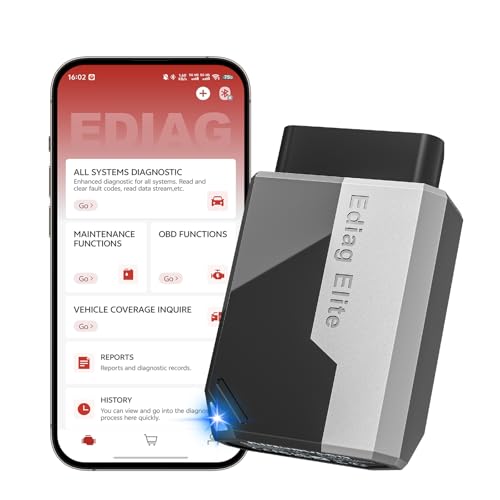
- 【Cost-effective Diagnostic Scan Tool】Lifetime updates without fee, No subscription fee required, No IP restrictions, Ediag Elite bluetooth scanner stands out. It can perform in-depth Full System diagnostics,15+ Reset Services, powerful Active Test, CANFD & FCA AutoAuth. Connect your phone via Bluetooth for diagnosis, providing a faster, smarter and smoother diagnostic experience. Easy to put in pocket, convenient to carry, keep track of the car's status anytime, anywhere. Best bang for your bucks.
- 【15+ Reset Service, Easy Problem Solving】 KINGBOLEN Ediag Elite obd2 scanner diagnostic scan tool comes with 15+ professional reset functions, including: Oil Reset, ABS Bleeding, Injector Code, SAS Reset, TPMS Reset, BMS Reset, AFS Reset, Sunroof Calibration, Brake Reset and more special functions in system diagnose menu. The ideal bluetooth scanner for mechanics and DIY enthusiasts, which can save unnecessary maintenance costs and significantly shorten repair time.
- 【Comprehensive Full Systems Diagnostic】 The Ediag Elite obd2 scanner bluetooth supports full system In-Depth diagnosis. It can read/clear fault codes, read real-time data/freeze frame, module information, and perform testing and reset functions for ECM, BCM, ABS, SRS, TPMS, TCM, BMS, SAS, A/C & RTM systems ect. It works with most car models after 1996, cover more than 150+ car brands. Supports 22 global languages for your convenience(EN, FR, ES, DE, IT, RU, PT, JP, TU...)
- 【Powerful Bidirectional Scan Tool & Active Test】 The obd2 code reader for Ediag Elite can perform real time active test that can send commands to the vehicle’s ECU to drive the actuators to work, such as turn on the radiator fan, modulate the throttle, open/close windows, etc. It can help you quickly find out the bad components and the cause of the fault, which can save you a lot of time. With BT 5.2 wireless connectivity, you can enjoy wireless diagnostics up to 33 feet.
- 【FCA AutoAuth & CANFD Compatibility】 Ediag Elite scan tool offers support with FCA Gateway Access, allowing you to perform protected functions on FCA vehicles, including Chrysler, Dodge, Jeep, Alfa Romeo, Fiat vehicles, etc.(Note:just allows you to access the FCA, but need to have your own FCA account) Supports the CAN-FD protocol, provide high-speed vehicle diagnostic communication and data transfer, working perfectly on GM vehicles produced after 2020, saving $100 to buy a CAN FD adapter.

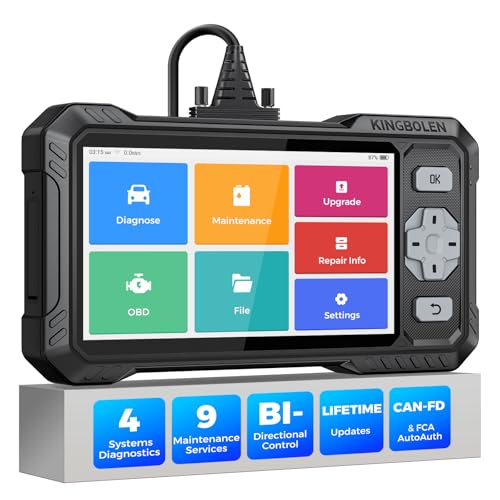
- WHY S608 STANDS OUT:2026 Kingbolen S608 is the only scanner <200 bucks that offers powerful active tests on Engine, ABS, SRS, and Transmission systems. Offers 9 resets,Covers 110+ global brands with a 6.2'' larger touchscreen
- KINGBOLEN'S NEW BIDIRECTIONAL SCAN TOOL: As the 2026 upgraded version of S600, our Newest S608 obd2 scanner has the powerful Bi-directional Control on Engine, ABS, SRS, and Transmission systems. It can send commands to the ECUs of actuators for functional tests and work status checks, such as ABS, fuel injectors, adjusting throttle, coolant pumps, EVAP test, fuel trim reset, etc. No more Guesswork. Quickly identify problem components without teardown, get fuss-free results in seconds.
- 【9 HOT RESET SERVICES CAR SCANNER】Tired of costly mechanic trips for common resets? The Kingbolen S608 obd2 scanner lets you do it yourself, even for beginners—quickly and effortlessly! It offers 9 hot reset functions: Oil/EPB Reset, ABS Bleeding, SAS Calibration, DPF Regeneration, Injector Coding, BMS Matching, Throttle Adaptation, Gear Learning. Stop paying mechanics for 5-minute jobs. Save hundreds per year! 🚗*Function vary from vehicle models. reach us to check compatibility firstly!
- 【4 SYSTEM DIAGNOSTIC TOOL + FULL OBDII FUNCTIONS】Kingbolen S608 is an OBDII scanner and 4 systems diagnostic tool made for home mechanics, DIYers, and professionals. You can access Engine, ABS, SRS, Transmission fault codes, track live data in graphs, and onboard DTC library lookup to find the right troubleshooting procedure, and diagnose with full 10 OBD2 test modes to fix most of emission issues. Give your aging cars routine maintenance to avoid costly repairs, a breakdown, or even a crash.
- 【NEW CAN FD, FCA/RENAULT SGW, 140+ BRANDS】Kingbolen S608 scanner for car supports 140+ vehicle brands, 100,000+ models, 28 languages and can be used worldwide. S608 stays up-to-date with modern vehicles, allows secure access to 2017+ FCA cars and 2015+ Renault cars (📢*Need to purchase an AutoAuth/Renault account by yourself), and supports the latest CAN-FD protocol for 2019+ GM/Chrysler, enabling 2X faster data transfer and more precise diagnostics. 🚗*Check compatibility before purchase.
This product presentation was made with AAWP plugin.
Last update on 2026-04-04 / Affiliate links / Images from Amazon Product Advertising API