
NHTSA ID Number: 11028516
Manufacturer Communication Number: A26-002
TSB/Document Date: 2026-02-06
Summary
Service Bulletin - The piston ring function deteriorates due to ring low wear toughness and sticking from sludge. Oil adheres to the spark plug leading to carbon fouling and misfire. This can set DTCs P0301 No. 1 cylinder misfire detected, P0302 No. 2 cylinder misfire detected, P0303 No. 3 cylinder misfire detected, P0304 No. 4 cylinder misfire detected, and cause the MIL to come on.
If the PDF is very large, it may not load in the preview below.
Some older TSBs had multiple PDFs — visit the NHTSA Website to view all PDFs.
If the TSB PDF does not show, download or view it on the NHTSA Website.
Click on the (+) Plus Sign
Then Click on Associated Document(s)
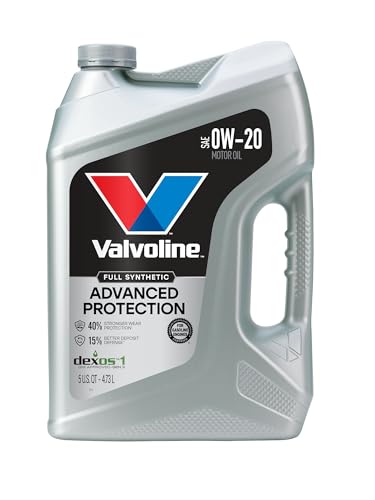
- Advanced protection against the four main causes of engine...
- Delivers 40% stronger wear protection than industry...
- Provides 15% better deposit defense vs. industry standards...
- Up to 2.5X better heat protection vs. industry standards to...
- Engineered for excellent low-temperature flow, reducing...
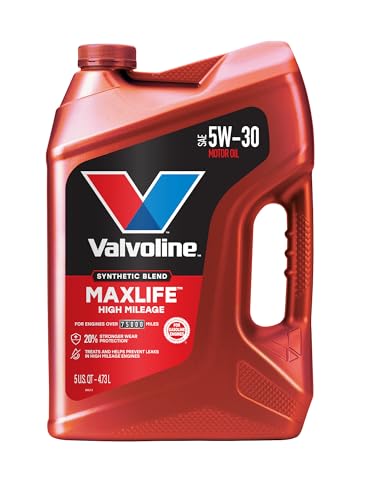
- Formulated for engines with 75,000 miles or more, Valvoline...
- Delivers 20% better wear protection and 15% better sludge...
- Extra detergents safeguard against friction, corrosion and...
- Advanced friction-fighting additives help maximize...
- Provides performance benefits for high mileage, new and...
Search NHTSA Database for Recalls
Search NHTSA Database for Vehicle Investigations
View Latest Vehicle Investigations
Search NHTSA Database for Vehicle Complaints
View Latest Vehicle Complaints
TSB/Document ID: A26-002
Replacement Service Bulletin Number:
MFR Communication Date: 2026-02-01
MFR Internal Campaign ID/Software Version:
Communication Type: Service Bulletin/Repair Instructions
NHTSA Components: ENGINE
MFR Component System:
MFR Component Subsystem:
Previous TSB | Next TSB |
2.
Install and torque the upper transmission hardware.
Page 70 of 109
3.
Install the front engine mount bracket.
4.
Loosely install the front engine mount using new bolts.
Page 71 of 109
5.
Loosely install the rear engine mount with new nuts and bolts.
NOTE: Do not install the heatshield and the engine mount stop until the rear catalytic converter is installed.
6.
Torque the front and rear engine mount bolts to specification.
7.
Remove the engine hoist.
Page 72 of 109
8.
Install the driveshaft base (C) and torque mounting bolts (A & B) to specification.
9.
Install the right driveshaft.
NOTE: Before starting installation, make sure the mating surfaces of the joint and the splined section are clean.
1.
Apply about 5 g (0.18 oz) of moly 60 paste to the contact area (A) of the outboard joint and the front wheel bearing.
2.
Clean the areas where the driveshaft contacts the differential thoroughly with solvent, then dry them with
compressed air.
NOTE: Do not wash the rubber parts with solvent.
Page 73 of 109
3.
Insert the inboard joint (A) into the differential.
NOTE:
• Insert the driveshaf t horizontally to prevent damaging the oil seal (B).
• Be caref ul not to damage the inboard joint ring (C).
• Make sure to set the “TOP” mark of the driveshaf t bearing bracket (D) to the upper side when installing it.
4.
Install the driveshaf t bearing bolts.
5.
Install the driveshaf t heat cover.
Page 74 of 109
10. Install the rocker arm oil pressure sensor cover.
11. Install the coolant connecting pipe with new O-rings onto the engine block.
Page 75 of 109
12. Transfer the original cylinder head dowel pins (C), then install new head gaskets (D).
13. Install the cylinder heads:
1.
Clean the timing belt pulleys, the timing belt guide plate, and the upper and lower covers.
2.
Set the timing belt drive pulley to top dead center (TDC) by aligning the TDC mark (A) on the timing belt drive
pulley with the pointer (B) on the oil pump.
Page 76 of 109
3.
Set the camshaft pulleys to TDC by aligning the TDC marks (A) on the camshaft pulleys with the pointers (B) on
the back covers.
4.
Install the cylinder heads onto the engine block.
NOTE: Cylinder head bolt diameter measurement was checked during disassembly. Replace any bolts that are
outside specification.
5.
Apply new engine oil to the threads and under the bolt heads of all cylinder head bolts.
Page 77 of 109
6.
Torque the cylinder head bolts in sequence to 29 N·m (22 lb-ft) using a beam-type torque wrench.
NOTE:
• When using a preset click-type torque wrench, be sure to tighten slowly and do not overtighten.
• If a bolt makes any noise while it is being torqued, loosen the bolt and retighten it f rom the f irst step.
Page 78 of 109
7.
Af ter all bolts have been torqued to 29 N·m (22 lb-ft), tighten all cylinder head bolts in two steps (90º per step)
using the same sequence as above.
NOTE:
• If you are installing a new cylinder head bolt, tighten the bolt an extra 90º.
• If you tightened a bolt beyond the specif ied angle, remove the bolt and start again at step 6 of the procedure.
Do not loosen it back to the specif ied angle.
14. Install the timing belt:
1.
Install the timing belt auto-tensioner.
NOTE: Ref er to the service manual f or the procedure to compress the tensioner bef ore installation.
Page 79 of 109
2.
Install the timing belt in a counterclockwise sequence starting with the drive pulley, being careful not to damage the
timing belt during installation.
3.
Tighten the idler pulley bolt.
4.
Remove the pin from the auto-tensioner.
Page 80 of 109
5.
Install the lower half of the side engine mount bracket using new bolts where required.
7.
Install the timing belt guide plate (A).
Page 81 of 109
8.
Install the lower timing belt cover.
9.
Install the upper timing belt covers (A & B).
Page 82 of 109
10. Install the crankshaf t pulley:
1. Remove any oil and clean the pulleys (A), the crankshaf t (B), the bolt (C), and the washer (D). Lubricate with
new engine oil.
2.
Install the crankshaf t pulley and tighten the bolt.
NOTE: Do not use an impact wrench.
1. Hold the pulley with the handle (A) and the holder attachment (B). Torque the bolt to 65 N·m (48 lb-ft).
Page 83 of 109
2.
Tighten the bolt an additional 60º.
11. Rotate the crankshaf t pulley six f ull turns clockwise to allow the timing belt to position itself on the pulleys.
12. Turn the crankshaf t pulley so the white mark (A) lines up with the pointer (B).
NOTE: The other pointer (C) is not used.
Page 84 of 109
13. Check the camshaf t pulley marks:
NOTE: If the marks are not aligned, rotate the crankshaf t 360 degrees and recheck the camshaf t pulley mark.
Are the camshaf t marks at TDC?
YES – Proceed to the next step.
NO – Remove the timing belt and repeat the installation process.
15. Adjust the valve clearance:
NOTE: Ref er to the service manual f or the f ull procedure.
Valve Clearance
Intake
0.20 - 0.24 mm (0.008 – 0.009 in)
0.28 - 0.32 mm (0.011 – 0.012 in)
Page 85 of 109
16. Apply Hondabond to the rocker arm oil control valve mating surf ace (A). Install the component within 5 minutes of
applying the Hondabond.
17. Set the spark plug seals (A) on the spark plug tubes and install the cylinder head covers (B).
NOTE: Tighten the bolts (C), in sequence, in three steps.
Page 86 of 109
18. Install the water passage with new water passage gaskets to the connecting pipe that was installed earlier.
19. Install the f uel joint pipe to the f uel rails with new O-rings, then attach the quick connect f itting and torque the bracket
mounting bolt to 22 N·m (16 lb-ft).
20. Install the engine wire harness.
21. Install the breather pipe.
Page 87 of 109
22. Install the connector bracket (A) to the f ront cylinder head.
23. Install the harness bracket (A) to the rear cylinder head.
Page 88 of 109
24. Install the intake manif old with a new intake manif old gasket.
NOTE: Tighten the bolts and nuts in three steps, f ollowing the torque sequence.
25. Install the upper cover (A) with a new upper cover gasket.
NOTE: Tighten the bolts and nuts in three steps, f ollowing the torque sequence.
26. Install the f ront catalytic converter with a new gasket and new self -locking nuts. Tighten the nuts in a crisscross pattern
in two to three steps. Final torque the mounting nuts to 31 N·m (23 lb-ft).
27. Install the rear catalytic converter with a new gasket and new self -locking nuts. Tighten the nuts in a crisscross pattern
in two to three steps. Final torque the mounting nuts to 31 N·m (23 lb-ft).
28. Install the rear engine mount stop and heat shield with new nuts and torque to 74 N·m (54 lb-ft).
Page 89 of 109
29. Install the starter assembly with a new gasket and torque the mounting bolts to 44 N·m (33 lb-ft).
NOTE: Ref er to service manual f or the f ull procedure.
30. Install the f ront engine mount stop with new nuts and torque to 74 N·m (54 lb-ft).
31. Install the EGR Pipe and torque the mounting bolts and nuts to 22 N·m (16 lb-ft).
32. Install the spark plugs (4 new) then install the ignition coils and connectors.
33. Raise the vehicle.
34. Line up lif t table and engine assembly under the vehicle.
35. Raise the lif t table while lining up the subf rame with the mounting holes on the bottom of the vehicle.
NOTE: Use the subf rame align pin if needed (070AG-SJAA10S).
Page 90 of 109
36. Install the subf rame with new bolts where indicated, then torque in sequence to specif ication.
Page 91 of 109
37. Install a new oil filter.
38. Install the bolts securing the oil pan to the transmission.
39. Attach the torque converter to the drive plate (A) with eight bolts (B). Rotate the crankshaf t pulley as necessary to
tighten the bolts to half of the specif ied torque, then do the f inal torque in a crisscross pattern. Af ter tightening the last
bolt, check that the crankshaf t rotates f reely.
40. Install the torque converter cover (C).
Page 92 of 109
41. Connect the rear engine mount actuator connector (D).
42. Connect f ront engine mount actuator connector (C).
43. Connect the power steering pressure switch.
Page 93 of 109
44. Connect the CKP connector (B) and install the cover (A).
45. Install the lef t and right f ront dampers.
Page 94 of 109
46. Connect the upper stabilizer links (A) to the dampers (B).and loosely install the f lange nut (C). Then tighten the f lange
nut to the specif ied torque, while holding the joint pin (D) with the hex wrench (E).
47. Install the lef t and right brake calipers (C) then install and tighten the caliper mounting bolts (B). Then install the brake
hose mounting bolts (A).
48. Install the wheel speed sensors and torque to 9.3 N·m (6.9 lb·ft).
49. Install the transmission ground and torque to 12 N·m (9 lb·ft).
Page 95 of 109
50. Connect the power steering hose (A), and the ATF cooler hoses (B).
51. Install the f ront WU-TWC bracket.
52. Install the rear WU-TWC bracket.
Page 96 of 109
53. With VTM-4 Only – Install the transf er assembly.
NOTE: For non-VTM -4 vehicles, proceed to step 53.
1. Clean the area where the transf er assembly contacts the transmission with solvent, and dry with compressed air.
Then apply transmission f luid to the seal contact area.
2. Install the dowel pin (A) in the transmission and install the transf er assembly (B) on the transmission.
3.
Install the propeller shaf t (A) to the transf er companion f lange (B) by aligning the ref erence mark (C). Make sure
you use new mounting bolts.
Page 97 of 109
4.
Secure the transf er breather hose bracket (A) on the transf er assembly with the bolt, and connect the breather
hose (B) over the breather pipe (C) with the dot mark (D) f acing out.
54. Install exhaust pipe A.
NOTE: Use new gaskets (B) and new self-locking nuts.
Page 98 of 109
55. Install the f ront subf rame suspension stif f ener.
56. Lower the vehicle.
57. Install the alternator. Ref er to the service manual f or the f ull procedure.
58. Lif t the vehicle to install the A/C compressor (A), then connect the A/C compressor clutch connector (B).
Page 99 of 109
59. Install the drive belt auto tensioner.
60. Install the power steering pump (A), then install the bolt (B) securing the power steering hose bracket (C).
Page 100 of 109
61. Connect the power steering pump inlet hose (C) and the power steering pump outlet hose (A) with a new seal (B) to
the power steering pump. Attach the power steering hose bracket (D).
62. Install the drive belt.
Page 101 of 109
63. Install the side engine mount (A) and the wire harness bracket (B).
64. Install the upper half of the side engine mount bracket (A) using new bolts, then install the ground cable bracket (B).
65. Install the PCM bracket, the harness clamps, and the engine wire harness connector, and torque the bracket bolts to
12 N·m (8.7 lb-ft).
66. Install the PCM and torque the mounting bolts to 9.8 N·m (7.2 lb-ft).
67. Install the PCM cover.
Page 102 of 109
68. Connect the PCV hose (C), the brake booster vacuum hose (B), and the IMT actuator connector (A).
69. Connect the coolant bypass hoses (A). Then connect the EVAP canister hose (E), the EVAP canister purge valve
connector (D), the throttle actuator connector (C), and the MAP sensor connector (B).
Page 103 of 109
70. Install the EVAP canister purge joint with the bracket.
71. Connect the f uel f eed hose (A), install the quick-connect f itting cover (B).
Page 104 of 109
72. Connect the transmission shift cable.
1.
Secure the shif t cable bracket (C) with the nuts.
2.
Attach the shif t cable end (A) to the selector control lever (D), then insert the control pin (E) into the selector control
lever hole, through the shif t cable end, and secure the control pin with the spring clip (F).
73. Install the Positive cable and nut on the starter and torque to 9.0 N·m (6.6 lb·ft)
74. Connect the heater hoses
Page 105 of 109
75. Connect upper and lower radiator hoses.
76. Install the battery base (A), and the harness clamps (B), then tighten the mounting bolts.
Page 106 of 109
77. Install the main under-hood f use box (A) and the harness clamps (B), then connect the engine wire harness (C) and
starter cables (D) to the main under-hood f use box.
78. Do the 12 Volt Battery Installation procedure. Ref er to the service manual f or the f ull procedure.
79. Install the air cleaner.
80. Install the engine cover.
81. Lif t the vehicle.
82. Install the inner f ender liners.
83. Install the splash shield.
84. Install the f ront wheels and torque to 127 N·m (94 lb-ft).
85. Lower the vehicle.
86. Align the bolt hole (A) on the steering joint with the groove (B) around the pinion shaf t, then loosely install the joint bolt
(C). Be sure that the joint bolt is securely in the groove in the pinion shaf t. Torque the joint bolt to specif ication.
Page 107 of 109
87. Ref ill the engine with engine oil.
After Engine Overhaul:
5.0 L (5.3 US qt)
88. With the ignition in the ON mode (key on with engine OFF), move the shif t lever to each gear and verif y that the A/T
gear position indicator f ollows the transmission range switch. Then turn the ignition to the OFF mode.
89. Ref ill the power steering reservoir with power steering f luid.
90. Ref ill the radiator with engine coolant.
91. Ref ill the transmission f luid.
NOTE: Do not overf ill the transmission with ATF.
With ATF Cooler:
3.4 L (3.6 US qt.) at change
Without AFT Cooler:
3.1 L( 3.3 US qt) at change
92. Inspect f or f uel leaks. Turn the ignition switch to ON (II) (do not operate the starter) so the f uel pump runs f or about 2
seconds and pressurizes the f uel line. Repeat this operation three times, then check f or f uel leakage at any point in the
f uel line.
93. Check the PCM software version P/N located above the PGM-FI Data List.
Year
Trim
Software System
New Program ID
2013–2014
Pilot (2WD)
PGM-FI
37805-RN0-M050
2013–2014
Pilot (4WD)
PGM-FI
37805-RN0-M950
2015
Pilot (2WD)
PGM-FI
37805-RN0-M140
2015
Pilot (4WD)
PGM-FI
37805-RN0-M840
94. Do the PCM update, if needed.
NOTE: For information on updating the PCM see service bulletin 22-100 Updating Control Units/Modules with the
Honda ECU Reprogramming Application
Is the PCM Program ID and/or Program P/N the same or newer than what is listed above?
NO – Update the PCM software.
YES – The correct software is installed; no update is needed.
95. Do the idle learn procedure.
96. Do the CKP pattern clear/CKP pattern learn procedure.
97. Do the cooling system bleeding procedure.
Page 108 of 109
98. Raise the vehicle.
99. Check f or f luid leaks.
100. Lower the vehicle
101. Check the wheel alignment.
102. Perf orm a road test.
Page 109 of 109

- CEL Doctor: The ANCEL AD310 is one of the best-selling OBD II scanners on the market and is recommended by Scotty Kilmer, a YouTuber and auto mechanic. It can easily determine the cause of the check engine light coming on. After repairing the vehicle's problems, it can quickly read and clear diagnostic trouble codes of emission system, read live data & hard memory data, view freeze frame, I/M monitor readiness and collect vehicle information.
- Sturdy and Compact: Equipped with a 2.5 foot cable made of very thick, flexible insulation. It is important to have a sturdy scanner as it can easily fall to the ground when working in a car. The AD310 OBD2 scanner is a well-constructed mechanic tool with a sleek design. It weighs 12 ounces and measures 8.9 x 6.9 x 1.4 inches. Thanks to its compact design and light weight, transporting the device is not a problem. The buttons are clearly labelled and the screen is large and displays results clearly.
- Accurate Fast and Easy to Use: The AD310 scanner can help you or your mechanic understand if your car is in good condition, provides exceptionally accurate and fast results, reads and clears engine trouble emission codes in seconds after you fixed the problem. This device will let you know immediately and fix the problem right away without any car knowledge. No need for batteries or a charger, get power directly from the OBDII Data Link Connector in your vehicle.
- OBDII Protocols and Car Compatibility: Many cheap scan tools do not really support all OBD2 protocols. AD310 scanner as it can support all OBDII protocols such as KWP2000, J1850 VPW, ISO9141, J1850 PWM and CAN. This device also has extensive vehicle compatibility with 1996 US-based, 2000 EU-based and Asian cars, light trucks, SUVs, as well as newer OBD2 and CAN vehicles both domestic and foreign. Pls confirm with our customer service whether it is compatible with your vehicle before purchasing.
- Home Necessity and Worthy to Own: This is an excellent code reader to travel or home with as it weighs less and it is compact in design. You can easily slide it in your backpack as you head to the garage, or put it on the dashboard, this will be a great fit for you. The AD310 is not only portable, but also accurate and fast in performance. Moreover, it covers various car brands and is suitable for people who just need a code reader to check their car.

- Multi-Functions - Practical Multi-Functions OBD2 code reader features built-in OBD2 DTC lookup library, which help you to determine the cause of the engine light, read code, erase code, view freeze frame, I/M ready, vehicle information, data flow, real-time curve, get vehicle speed information, calculate load value, engine coolant temperature, get engine speed.
- Wide Capability - Supports 9 protocols compatible with most 1996 US-Based, 2000 EU-Based and Asian cars, and newer OBD II & CAN domestic or import vehicles. Supports 6 languages - English,German, Dutch, Spanish, French, Italian.
- 2.8" LCD Display - Designed with a clear display 2.8" Large LCD screen - white backlight and contrast adjustment. No need any battery or charger, OBD reader gets the power directly from your vehicle through the OBDII Data Link Connector.
- Compact Design - Car diagnostic scanner is equipped with a 2.5 feet long cable and made of a very thick flexible insulator.There are 6 buttons on OBD2 Scanner:scroll up/down,enter/exit and buttons that quick query VIN vehicle number& the DTC fault code.
- ABS / Airbag codes NOT Supported - It is able to read and clear check engine information which is part of OBDII system, but it cannot work with non-OBDII systems, including ABS / Airbag / Oil Service Light, etc.

- 【Your Personal CEL Doctor – Read & Clear Engine Codes】The NT301 OBD2 scanner lets you read diagnostic trouble codes (DTCs), check em-issions readiness, turn off your Check Engine Light (CEL) or MIL, reset monitors, and view live data streams. It retrieves your vehicle's VIN instantly. Like all standard OBD2 scanners, it clears codes only after repairs are completed—if the issue persists, the code will return. Designed for DIYers who want to understand what’s really going on under the hood.
- 【Easy Code Reading – Just Plug & Play】Simply plug into the OBD2 port, turn the ignition to “ON” (engine off), and select the correct menu: Select OBDII-> Wait for seconds-> Select Read codes. For accurate results, ensure your vehicle is compatible and the OBD2 port is free from damage or wiring issues. No batteries needed— powered directly by your car.
- 【Live Data Graphing & Accuracy for Most OBD2 Vehicles】View and log live sensor data in graph form—monitor oxygen sensors, fuel trims, coolant temp, RPM, and more. Spot trends and suspicious values in real time. Compatible with most 1996+ gasoline cars, light trucks, and SUVs sold in the U.S., as well as many 2000+ European and Asian models. Also works on 12V diesel vehicles equipped with OBD2.
- 【S-mog Check Helper – Know Your Readiness Status at a Glance】With dedicated I/M readiness hotkeys and a simple Red-Yellow-Green LED indicator, you’ll instantly know if your vehicle is ready for em-issions testing. Built-in speaker provides audio feedback. No guesswork—just confidence before you head to the test center.
- 【A Must-Have Tool for Every Home Mechanic】Compact, rugged, and ready to use right out of the box. The 2.8” color screen is easy to read, even in daylight. No charging or setup required—just plug into the 16-pin DLC and start diagnosing. Recommended by professional mechanics on YouTube and trusted by DIYers worldwide.
Last update on 2026-03-23 / Affiliate links / Images from Amazon Product Advertising API
This product presentation was made with AAWP plugin.